

This white paper describes the basic steps for migrating an existing WinForms application to Wisej – the first Web Integrated Server Environment for creating Real Time Web Applications.
To create a new Wisej application from scratch, check this tutorial:
https://docs.wisej.com/docs/welcome/getting-started.
If you’re interested in an automatic conversion of your existing applications (WinForms, VB6, or even Visual WebGUI) please contact us at http://www.fecher.net/contact
-
Prerequisite: Install Wisej from https://wisej.com/
-
Change the project type from a WinForms executable to a Wisej web project. There are two ways to do this: Create a new Wisej project and copy over all the files from the original WinForms application; if you choose this approach then you can skip steps 3 and 4 as the assemblies and the configuration files will be added automatically;
-
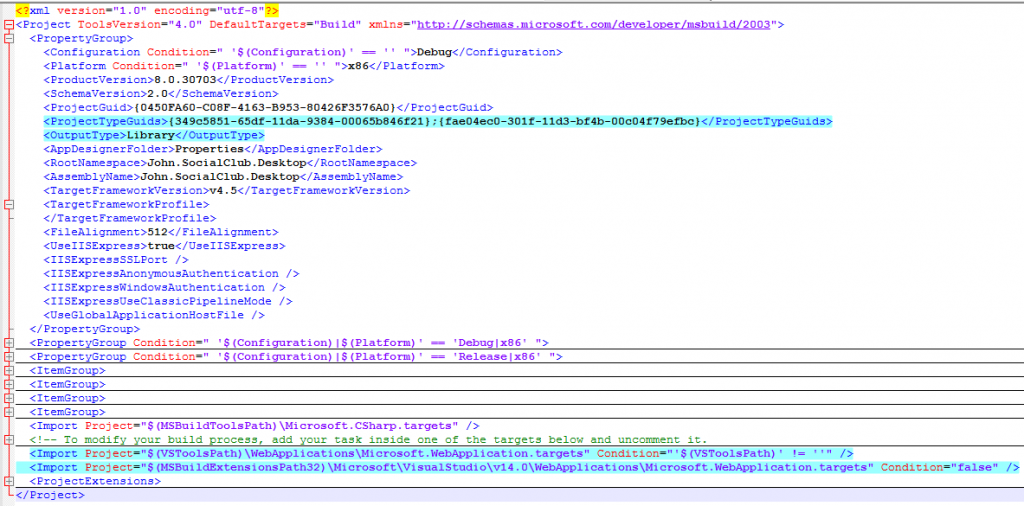
Change the settings of the existing project. You can do this by editing the .csproj file in a text editor and make the following changes: Add the project type GUIDs under the ProjectGuid node:{349c5851-65df-11da-9384-00065b846f21};{fae04ec0-301f-11d3-bf4b-00c04f79efbc}
-
Change the OutputType from WinExe to Library
-
Add the import nodes for the web applications under the main Project node:
-
Open the WinForms solution and add the references to the Wisej assemblies: Wisej.Web.dll and Wisej.Core.dll. Note: if these assemblies doesn’t appear in the list check the target .NET framework version; it has to be at least .NET 4.5.
-
Add the configuration files to the project. You will need the following files: Default.html
-
Default.json
-
Web.Config All these files are generated by default when creating a new Wisej project, so you can simply copy them over from a new project. You can find a detailed explanation of these here: https://docs.wisej.com/docs/concepts/configuration
-
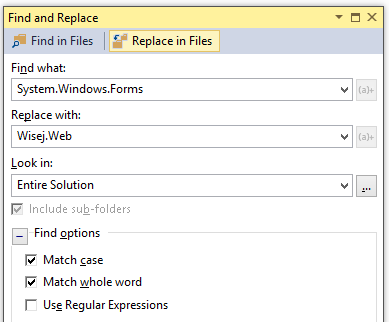
Replace all occurrences of System.Windows.Forms with Wisej.Web
-
Build the application and resolve the compiler errors: in most of the cases you will get compiler errors due to some missing properties and/or methods that are obsolete in Wisej. You can simply comment out these.
-
Change the Main method; in a typical WinForms application you probably had something like this in the Main method:
 The first two lines can be commented out as they are not needed in a web application. The third one has to be changed to show instead the Login dialog: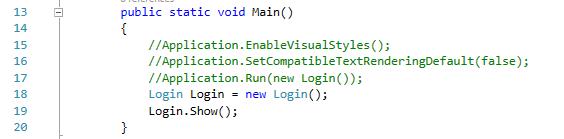
-
Change the startup method in the Default.json file to the Main method from Program.cs:

-
That’s it! You should be able to run now the Wisej application.
Download Migration Guide
Zip File (430 Kb)